
The Linktree alternative that doesn't look like a Linktree.
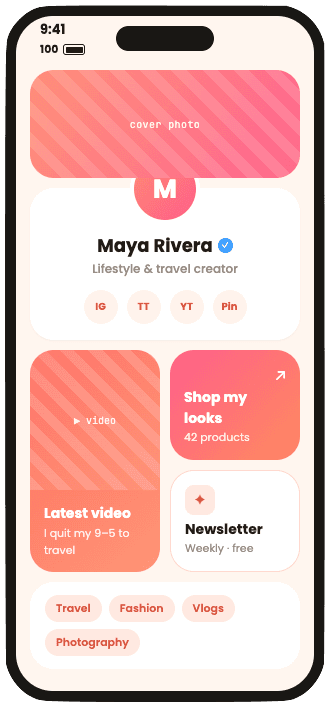
Linktree gives you a column of buttons and charges $17 a month before you can pick your own font, embed a YouTube video or edit your SEO. ContentLinks gives you a bento grid where all three are free. Paste your Linktree link and we bring everything over in about a minute.
- Free plan for life
- Imports your Linktree
- 14 days of Premium, no card
 By Saiprasad Acharya, founder. Updated
The short answer
What's the best Linktree alternative?
For most creators and small businesses, ContentLinks. It's a free bento-grid link in bio tool where fonts, SEO settings, background images and video embeds cost nothing, and Premium is $9 a month against Linktree's $17 Pro and $35 Premium. It imports your Linktree in about a minute.
ContentLinks is the better fit if
- You want a page that looks designed, not the template everyone recognizes
- You want SEO settings, every font and video embeds without a paid plan
- You want analytics export, country rules and gated links for $9, not $17 or $35
- You'd like analytics that don't need a cookie banner
Linktree is the better fit if
- You sell courses or digital products and want the checkout inside the page
- You want Instagram auto-replies and a post scheduler in the same app
- You run an agency and need team workspaces for dozens of pages
The bill
Same page. Very different bill.
What each of these costs on Linktree, next to what it costs here. US prices, billed monthly.
Itemised, per month
| You want to | Linktree | ContentLinks |
|---|---|---|
| Remove the logo from your page | $17Pro | $9Premium |
| Write your own SEO title and description | $17Pro | Free |
| Embed a YouTube video on the page | $17Pro | Free |
| Pick your own font for your name | $17Pro | Free |
| Use your own photo as the background | $17Pro | Free |
| See where visitors come from, by country | $17Pro | $9Premium |
| Lock a link behind a password | $17Pro | $9Premium |
| Export your analytics | $35Premium | $9Premium |
| Show different links in different countries | $35Premium | $9Premium |
| All of itThe plan that covers every line | $35$360/yr | $9$89/yr |
Linktree Premium vs ContentLinks Premium
Linktree plans and features from linktr.ee/s/pricing, checked November 10, 2026. Linktree shows local prices by region and charges less per month on yearly plans. Ours are $9 a month or $89 a year, everywhere.
Why people switch
The things Linktree charges for, or doesn't do at all.
None of these are exotic. They're the basics of a page that looks like yours, and on Linktree most of them start at Pro.
A grid, not a queue.
On Linktree every link waits its turn in one column. Here you make the important link twice the size, put your newest video beside it and let the rest sit underneath. Same links, a link page people actually look at.
SEO that doesn't need a Pro plan.
Linktree keeps SEO settings on Pro. On our free plan you write your own meta title and description, choose whether search engines may index the page, and publish Person or Organization schema, so the page can rank as a real one page website.
Fonts are not a luxury.
Choosing your own title font is a Pro feature on Linktree. All 160+ of our fonts are free, on every block, with size, weight and line height controls.
Embed the video. Don't just link to it.
YouTube embeds are Pro on Linktree. Our Social Post block plays posts from YouTube, TikTok, Instagram, X, Spotify, Bluesky and seven more platforms, right on your page, free.
Analytics without a cookie banner.
We count views, clicks and unique visitors without cookies and without storing IP addresses, so nothing has to pop up in front of your page. Referrers, countries and CSV export are on Premium at $9.
Feature by feature
ContentLinks vs Linktree, line by line
Where a feature costs money, the cell shows the cheapest plan that has it. The rows Linktree wins are in here too.
ContentLinks comes out ahead on 15 of 26 rows. Linktree wins 7. We left those in.
| Feature | ContentLinks | Linktree |
|---|---|---|
| Design | ||
| Page layoutLinktree can feature a link or group links in a collection (Starter and up), but the page still reads top to bottom. | Bento grid, free | A column of links |
| Choose your own fonts | 160+, free | Pro, $17/mo |
| Your own image as the background | Free | Pro, $17/mo |
| Hero or banner header | Premium, $9/mo | Pro, $17/mo |
| Remove the platform's logo | Premium, $9/mo | Pro, $17/mo |
| What you can put on it | ||
| Unlimited links | Free | Free |
| Embed YouTube videos | Free | Pro, $17/mo |
| Email and phone sign-ups | Email, free | Free |
| Contact form | Premium, $9/mo | Free |
| Hide a link behind a password or code | Premium, $9/mo | Pro, $17/mo |
| Schedule a link to appear | Premium, $9/mo | Starter, $9/mo |
| Show links by country | Premium, $9/mo | Premium, $35/mo |
| Search and reach | ||
| SEO title and description | Free | Pro, $17/mo |
| QR code for your page | Free | Free |
| Analytics | ||
| History on the free plan | 7 days | 28 days |
| Traffic sources and countries | Premium, $9/mo | Pro, $17/mo |
| Export your analytics | Premium, $9/mo | Premium, $35/mo |
| Google Analytics and Meta Pixel | Premium, $9/mo | Pro, $17/mo |
| Selling and extras | ||
| Checkout built into the pageOur Payment Link and Tip Jar blocks open your own Stripe, PayPal, Lemon Squeezy, Gumroad, Mercado Pago or UPI checkout. | Links to your checkout | Pro, $17/mo |
| Platform fee on your salesLinktree needs Pro or Premium to sell digital products. | 0%, always | 0% on Pro |
| Instagram auto-replies | Not offered | Pro, $17/mo |
| Social post scheduler | Not offered | Premium, $35/mo |
| iOS and Android app | Browser only | Free |
| Price | ||
| Cheapest plan without the logo | Premium, $9/mo | Pro, $17/mo |
| Everything on this page | Premium, $9/mo | Premium, $35/mo |
| Free trial of the paid plan | 14 days, no card | 7 days |
Linktree's side is from its pricing page and help center, checked November 10, 2026, in US dollars on monthly billing. Spot something that changed? Email us and we'll fix it.
About ContentLinks
So what is ContentLinks, exactly?
ContentLinks is the link in bio tool inside ContentAnchor. You get one address, contentanchor.com/yourname, for every bio, email signature and QR code. The page behind it is a bento grid you arrange yourself, so your newest video, your shop and your booking link can each get the space they deserve instead of queuing in one column.
Because it publishes real, server-rendered HTML with its own SEO settings, the same page works as a link page and as a small website: a hero, an about section, products, reviews and a contact form, with hosting included. Most people who move over from Linktree start by importing their links and end up with a page that explains what they actually do.
Explore the link in bio toolLink page builder
Drag links, posts and products into a bento grid and make the important ones bigger.
One page website builder
A hero, your services, proof and a contact form on one indexable page.
Example link pages
A creator, a shop, a founder, a musician, a coach and a restaurant, all built in ContentLinks.
Free vs Premium
Every feature in one table: what's free, and what Premium adds for $9.
In the wild
Real pages, run by real businesses.
A garden equipment shop in France and a hair and makeup studio working across four countries. Neither of them is a list of buttons. Tap one to see it live.
See more example pages

In fairness
Where Linktree is the better pick
We'd rather you choose the right tool than switch and regret it. Linktree is genuinely ahead here.
Selling inside the page
Linktree has its own checkout for digital products, courses and bookings, with no Linktree fee on Pro. Our payment blocks send buyers to your own checkout instead.
Instagram auto-replies
Linktree Pro can answer Instagram comments and DMs for you. We don't do that, and we're not pretending to.
Social media scheduling
Linktree Premium schedules posts across your social accounts. We build link pages, not a scheduler.
An app and a famous name
Linktree has iOS and Android apps and says it has over 70 million users, so plenty of people recognise linktr.ee. Our editor runs in your browser.
Teams and agencies
Linktree has workspaces for 9 or 50 pages with team roles. ContentLinks Premium gives one person unlimited pages, without team seats.
If those are why you pay Linktree, keep paying Linktree. If you're paying $17 a month to change a font and hide a logo, that's a different conversation.
Switching
Move from Linktree in about a minute
No copying links one by one. The importer reads your public Linktree and builds a starter page from it.
- 1
Claim your name
Pick contentanchor.com/yourname and create a free account. No card, and you start with 14 days of Premium.
- 2
Paste your Linktree link
In the start dialog, choose Moving from Linktree? and paste linktr.ee/yourname. Your name, bio, photo, up to 30 links and your social icons come with it.
- 3
Turn the list into a grid
Make the links that matter bigger, add your latest video, a product or your opening hours, and pick a font you actually like. Stuck? Borrow a layout from the example pages.
- 4
Publish and swap your bio link
Publish, then replace linktr.ee/yourname in your Instagram, TikTok and YouTube bios. Your Linktree keeps working until you delete it, so nothing breaks mid-switch.
Questions
Linktree questions, answered.
Is ContentLinks really a free Linktree alternative?
Yes. ContentLinks has a free plan that stays free for life: one published page, 17 block types, all 160+ fonts, 10 templates, SEO settings, a QR code and 7 days of analytics. Premium is $9 a month or $89 a year and adds unlimited pages, all 29 block types, gates, full analytics and no badge. New accounts get 14 days of Premium free, no card.
Can I import my Linktree?
Yes. Paste your public Linktree link (linktr.ee/yourname) in the start dialog and ContentLinks copies your name, bio, profile photo, up to 30 links and your social icons into a new page. Password-protected Linktrees can't be read, so add those links by hand.
Is ContentLinks cheaper than Linktree?
For the same features, yes. Removing the logo costs $17 a month on Linktree Pro and $9 on ContentLinks Premium. Analytics export and links by country need Linktree Premium at $35 a month; both are in our $9 plan. These are US monthly prices, checked on November 10, 2026, and our free and Premium plans are listed in full on the ContentLinks page.
Is ContentLinks better than Linktree for SEO?
On the free plan, yes. Linktree puts SEO settings on Pro. ContentLinks pages are server-rendered HTML with your own meta title and description, an index or noindex switch and Person or Organization schema, all free. Once a page has your name, a photo, three links and a URL you chose, search engines can index it.
Does ContentLinks take a cut of my sales?
No. ContentLinks never handles the payment. Payment Link and Tip Jar blocks open your own Stripe, PayPal, Lemon Squeezy, Gumroad, Mercado Pago or UPI checkout, so the only fees are the ones your payment provider charges.
What do I lose if I leave Linktree?
Linktree's built-in checkout for courses and digital products, Instagram auto-replies, social post scheduling, its mobile apps and team workspaces. If you rely on those, Linktree is the better fit. If you mostly need a page with links, posts, products and a way to reach you, you lose the column and not much else.
Will my old Linktree link stop working?
Not unless you delete your Linktree. Your linktr.ee page keeps working on its own, so you can move your bio links to ContentLinks at your own pace.
Can I still make a simple list of links?
Yes. Make every block full width and you have a classic stack of buttons. The grid just means your link page doesn't have to stop there.
What happens if I stop paying for Premium?
Nothing is deleted. Your first page stays live, Premium blocks are hidden from the public page, and any extra pages pause until you upgrade again.
Your link in bio deserves
more than a column.
Free to start, $9 when you want more. Bring your Linktree with you.
I already have an accountMore comparisons
How we compared
We build ContentLinks, so we have a side. Every claim about Linktree comes from its own public pages or from something we checked ourselves, last on . Prices and plans change; if something here is out of date, email us and we'll correct it.
Product names are trademarks of their owners and are used here only to identify those products. ContentAnchor is not affiliated with, sponsored by or endorsed by Linktree or Linktree Pty Ltd.